Sony WH-1000XM5 battery percentage on Mac
Your Mac plays audio through the XM5 all day but rarely tells you how much charge is left. Here is why, and every way to see the battery level without picking up your phone.
Why macOS often shows no battery level for Sony headphones
Apple's own AirPods and Beats report their charge to macOS through Apple-specific channels, so their percentage shows up in Control Center and the Bluetooth menu. Third-party headphones are a different story: for Sony models the value can be missing, appear only after a reconnect, or stay stale for hours. Sony sends exact battery and charging status over its own control protocol, the one the Sony phone app uses, and macOS does not read it.
4 ways to check XM5 battery while working on a Mac
- Voice prompt. With the headphones on, briefly press the power button. The voice guidance says “Battery about XX%”. Sony notes it is a rough estimate. Free and always available, but you have to remember to do it.
- Control Center → Bluetooth on the Mac. Hover or open the Bluetooth module and look for a percentage next to the headphones. If it is there, good; on many setups it is not, or it is out of date.
- Your phone. The iPhone Batteries widget or Sony's phone app shows the level, but only if the phone is also connected (multipoint), which adds a second device fighting for the headphones.
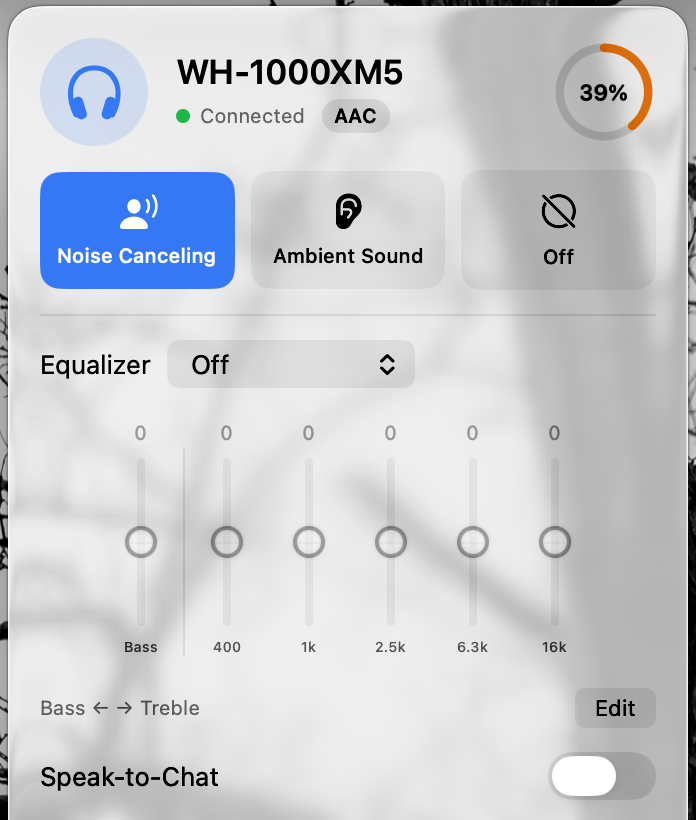
- A menu bar app. Headphone Control talks to the headphones over the same control channel as Sony's phone app and shows the percentage right next to its icon. Details below.
Battery % in the Mac menu bar with Headphone Control
- Always visible: the battery percentage sits next to the headphone icon in the menu bar; the icon itself shows the current noise mode.
- Fresh: the level is re-read every 60 seconds while connected, with a charging indicator when the cable is in.
- Low-battery alerts: optional macOS notifications at 20%, 10% and 5%, so you can charge before a call instead of during it.
- Same panel, more controls: Noise Canceling / Ambient / Off, ambient level, EQ presets and the multipoint device list.
No account, no network access: the app is sandboxed with only the Bluetooth entitlement.
Getting more hours out of the XM5
- Sony rates the WH-1000XM5 at up to 30 hours over AAC (the codec a Mac uses) with noise canceling or Ambient Sound on, and up to 40 hours with both off. At a quiet desk, Off is the mode that actually saves battery; Ambient costs the same as NC.
- A short top-up goes a long way: about 1 hour of playback from 3 minutes of charging, or about 3 hours with a USB PD charger.
- Disconnect devices you are not using from multipoint; fewer links means less radio work.
- Keep firmware current through Sony's phone app; Headphone Control shows the firmware version but does not update it.
Figures from Sony's WH-1000XM5 Help Guide: Available operating time and Checking the remaining battery charge; real-world life depends on volume, codec and ANC use.
FAQ
Why doesn't my Mac show the battery level of my Sony WH-1000XM5?
macOS shows battery levels reliably for Apple and Beats headphones. For third-party headsets like Sony's, the percentage in Control Center or the Bluetooth menu is inconsistent: it may be missing, appear only sometimes, or not refresh. Sony reports detailed battery information over its own control protocol, which macOS does not read.
How can I check WH-1000XM5 battery without my phone?
Press the power button briefly while the headphones are on and the voice guidance says “Battery about XX%”. On a Mac, Headphone Control shows the percentage next to its menu bar icon and refreshes it every minute.
Does Headphone Control warn me when the battery is low?
Yes. It can send a macOS notification when the battery drops to 20%, 10% and 5%. The alert resets after the headphones are charged above 25%. You can turn alerts off in settings.
Does it work with WH-1000XM4, XM6 or WF-1000XM5?
Battery reading has been verified on real hardware only with the WH-1000XM5. Other Sony models are implemented from the protocol and are marked as not yet hardware-tested.
See your XM5 battery from the menu bar
Free · Closed source · macOS 14+ · Tested on WH-1000XM5; hardware feedback needed for other Sony models.