
Sony WH-1000XM5 on Zoom, Teams & Meet (Mac)
Muffled sound after a call, a thin microphone, or audio that stays on your phone: why it happens on macOS and the fastest fixes.
Why Bluetooth headphones sound worse on calls
Bluetooth headphones use two very different modes. Music uses the stereo A2DP profile. A call needs a microphone, so the headset switches to the hands-free HFP profile, which carries much less audio data. On a Mac, the switch happens as soon as an app opens the headphone microphone, and everything you hear drops in quality until the microphone is released. Apple describes this in If sound quality is reduced with Bluetooth headphones.
That is why the problem appears in Zoom, Microsoft Teams, Google Meet or FaceTime but not in Apple Music, and why it can linger after you leave the meeting if the app keeps the microphone open.
Fixes, in the order worth trying
- Use the Mac's own microphone. In System Settings → Sound → Input choose MacBook Pro Microphone (or your Mac's built-in mic) instead of the headphones. In Zoom, Teams or Meet pick the same device in the audio settings. The headphones stay on stereo playback; your voice goes through the Mac mic. Trade-off: the Mac mic hears the room, so it works best in a quiet space.
- Or accept HFP for the call, and recover afterwards. If you want the headphone microphone (for example when you are walking around), leave it selected, then after the call quit the app completely and reselect the headphones in Control Center → Sound.
- Stop apps from grabbing the mic in the background. Check System Settings → Privacy & Security → Microphone and the orange mic indicator in the menu bar. If it stays lit after a call, quit that app.
- Reset the link if sound stays thin. In System Settings → Bluetooth disconnect and reconnect the headphones. This forces a fresh profile negotiation.
- Check the output device. In System Settings → Sound → Output make sure the headphones, not a display or the Mac speakers, are selected after the call.
None of these are specific to Headphone Control; they are macOS and Bluetooth behavior. The app only changes the headphone's own settings (noise mode, ambient level, EQ, multipoint).
Phone and Mac both connected (multipoint)
With multipoint, the XM5 stays connected to your phone and your Mac at the same time. Calls on the phone take priority over music, and a call app on the Mac can compete with the phone for the audio route.
A video call opens on the Mac but I hear nothing in the headphones
Pause or end any audio on the phone first; an app that still holds the stream keeps focus. Then reselect the headphones in Control Center → Sound. In Headphone Control, the multipoint list shows which device currently holds the connection, and Play on Mac pulls playback to the Mac with one click.
My phone rings during a Mac call
A phone call usually takes over the headphones. After hanging up, the Mac audio can come back on its own or may need Play on Mac or a reselect in Sound settings.
Settings control does not respond during a call
Only one app at a time should talk to the headset's control channel. Close Sony's headphone app on the phone, then use Scan again in Headphone Control.
Switch noise mode automatically when a call starts
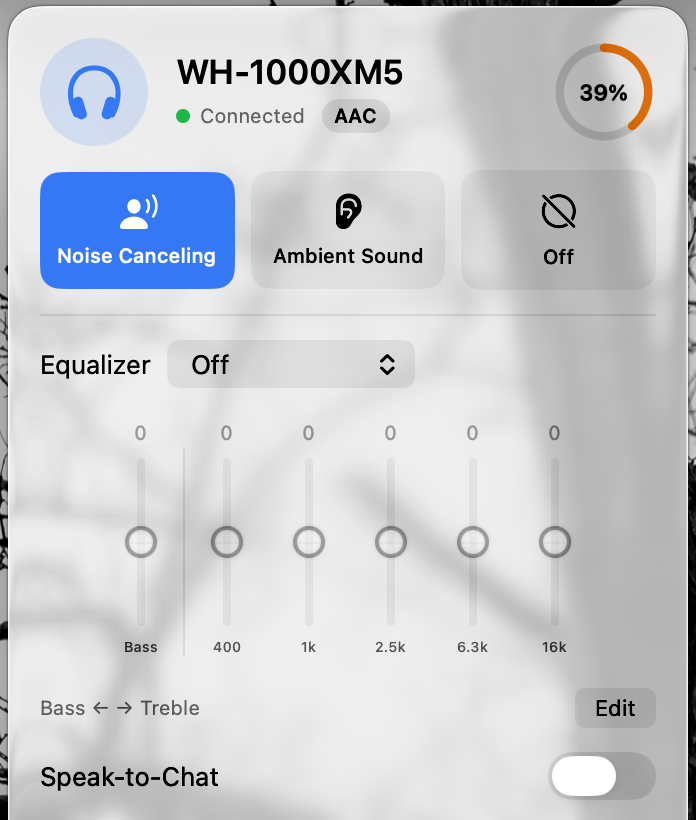
On tested WH-1000XM5 hardware, Headphone Control can apply a Profile automatically while the Mac's microphone is in use, for example Ambient Sound on so you hear your own surroundings during a meeting, or Noise Canceling on for a focus call. It reads the macOS mic-in-use state without accessing the microphone, and restores your previous noise mode and EQ when the rule ends.
Rules can also trigger when a chosen app is open or when the screen locks.
Only WH-1000XM5 screenshots are shown. Other Sony models await real-hardware confirmation.
Try Headphone Control 1.1 on your Mac
Free · Closed source · macOS 14+ · Tested on WH-1000XM5; hardware feedback needed for other Sony models.
Verified help & related guides
- WH-1000XM5 battery percentage on Mac
- WH-1000XM5 on Mac: full setup, ANC & EQ walkthrough
- WH-1000XM4, XM5 & XM6 on Mac: multipoint and a 2-minute hardware check
- Headphone Control vs SonyBridge vs Open Sound Connect
- Apple: If sound quality is reduced with Bluetooth headphones
- Apple: Change the sound output settings on Mac
- Sony WH-1000XM5 Help Guide: Pairing and connecting with a Mac