How to change Sony ANC and EQ on a Mac
Use the Mac menu bar for everyday noise and sound settings. This walkthrough is hardware-tested on WH-1000XM5 only.
Join the free betaChange ANC and EQ step by step
- Connect and installPair WH-1000XM5 in System Settings > Bluetooth. On macOS 14+, install Apple TestFlight, accept the beta invitation, then click Install. Open Headphone Control and allow Bluetooth access.
- Change noise controlOpen the menu-bar panel and wait for Connected. Choose Noise Canceling for isolation, Ambient Sound to hear around you, or Off to disable those modes. With Ambient selected, adjust its level gradually.
- Compare EQ at the same volumePlay a familiar track at a comfortable level. Choose an EQ preset, then compare it with Off at the same playback volume. Adjust Clear Bass or the custom bands a little at a time.
- Check the resultListen for the change and check the selected setting in the panel. Test noise control and EQ separately. If the interface changes but the sound does not, report that exact behavior rather than counting it as a successful control.
What this changes, and what it does not
ANC and Ambient Sound are headphone modes. They are different from your Mac’s output volume and from a music app’s software EQ. A browser or music-player equalizer changes that app’s audio; it is not a Sony headphone setting.
Headphone Control is not a firmware updater. Keep Sony Sound Connect for updates and model-specific setup. The free beta is closed source and requires macOS 14+.
If the control does not take effect
- No sound at all
- Check System Settings > Sound > Output and play audio before troubleshooting the controller.
- Audio works, panel does not connect
- Check the app’s Bluetooth permission. As a diagnostic, close the phone controller and other desktop controllers, reconnect the headphones and retry one app at a time.
- Music changes quality during a call
- Apple explains that using the headset microphone can switch Bluetooth into a lower-quality two-way mode. This is separate from EQ. Close apps using that microphone and reselect the headphones if needed.
Real app. One tested model.
This is a real WH-1000XM5 screenshot. It does not demonstrate XM4, XM6 or WF-1000XM5 compatibility.
Headphone Control with WH-1000XM5 on real hardware.
Watch the real XM5 demo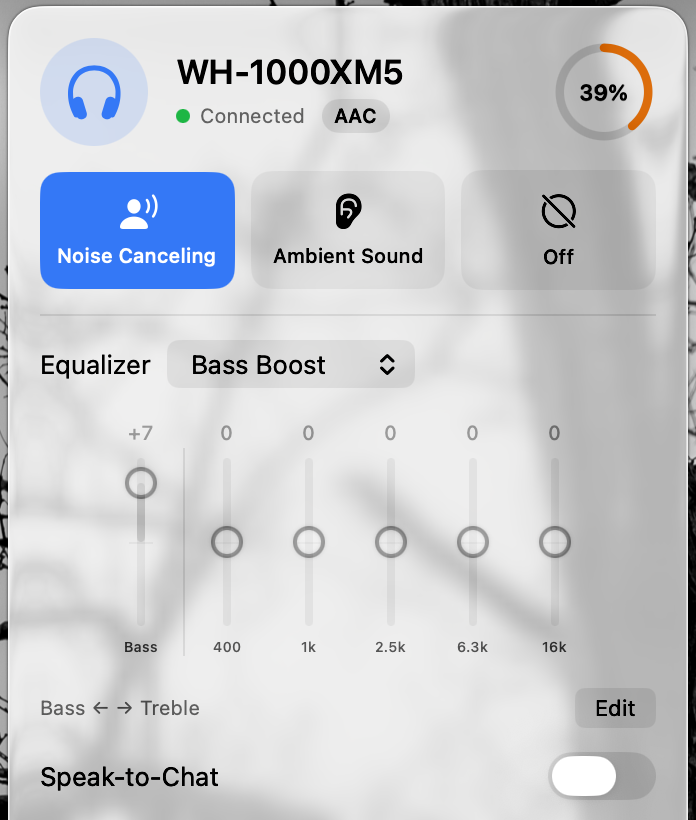
Questions
Can the macOS Bluetooth menu change Sony EQ?
The built-in Mac Bluetooth and Sound settings handle pairing and audio routing. They do not provide Sony’s custom headphone EQ controls. Use Sony’s mobile app or an independent compatible controller.
Will these steps work on XM4, XM6 or WF-XM5?
Only WH-1000XM5 has been hardware-tested with Headphone Control. WH-1000XM4, WH-1000XM6 and WF-1000XM5 are untested; their model pages explain how to report a beta test.
Sources
Primary sources checked on 16 November 2026. Manufacturer pairing instructions describe Bluetooth audio, not Headphone Control compatibility.
Join the free beta
On your Mac: install Apple TestFlight, open the invitation, then Accept → Install. Accepting alone does not install the app. Requires macOS 14+, even if Apple’s generic invitation text says 13. App Store 1.0 is under review.
Join the free betaKeep reading
- Sony Headphones Connect for Mac: your alternatives
- Sony WH-1000XM4 on Mac: pairing, multipoint & beta testing
- Sony WH-1000XM6 on Mac: setup & an honest beta test
- Sony WF-1000XM5 on Mac: earbuds setup & beta testing
- Sony headphone apps on Mac: five options compared
- Why I made Headphone Control for the Mac