Sony Headphones Connect for Mac: your alternatives
Looking for Sony Headphones Connect on your Mac? Here are the official mobile app and independent desktop options.
Join the free betaHeadphones Connect is now Sound Connect
Sony renamed its mobile app to Sony | Sound Connect in October 2024. The official Apple listing is for iPhone; it is not a native macOS controller. It offers EQ, noise control and headphone software updates. Keep it for firmware and Sony-specific setup.
Connecting headphones to a Mac for music is a separate task. macOS can pair them and select them as audio output without a Sony app. That does not give the Bluetooth menu Sony’s full ANC and EQ controls.
An independent Mac option: Headphone Control
Headphone Control puts noise canceling, ambient sound, EQ and device switching in the menu bar. It is a free, closed-source beta for macOS 14+. Only the WH-1000XM5 has been tested on real hardware by the developer. One user reports WH-CH720N works. WH-1000XM4, WH-1000XM6, WF-1000XM5 and the rest are untested.
The screenshot below is from a real WH-1000XM5. It is evidence for that model only. This app is independently developed and is not made or endorsed by Sony.
Choose by the job you need done
- Pair headphones or change audio output
- Start with macOS Bluetooth and Sound settings. You do not need another app for ordinary listening.
- Update headphone firmware
- Use Sony’s official mobile app. Headphone Control is not a firmware updater.
- Adjust ANC or EQ while working on a Mac
- Try a desktop controller. Check its own model list and minimum macOS version first.
- Read or modify the source
- SonyBridge and Open Sound Connect publish their source. Headphone Control does not.
Install the beta on a Mac
- Check that your Mac runs macOS 14 or later.
- Install Apple’s TestFlight app on the Mac, then open the beta invitation.
- Choose Accept, then Install inside TestFlight. Accepting the invitation alone does not install the app.
- Pair the headphones in macOS Bluetooth settings, open Headphone Control and allow Bluetooth access when requested.
Apple’s invitation page may show a generic macOS 13 requirement. The app itself requires macOS 14+. App Store 1.0 is under review; the available download here is the TestFlight beta.
Real app. One tested model.
This is a real WH-1000XM5 screenshot. It does not demonstrate XM4, XM6 or WF-1000XM5 compatibility.
Headphone Control with WH-1000XM5 on real hardware.
Watch the real XM5 demo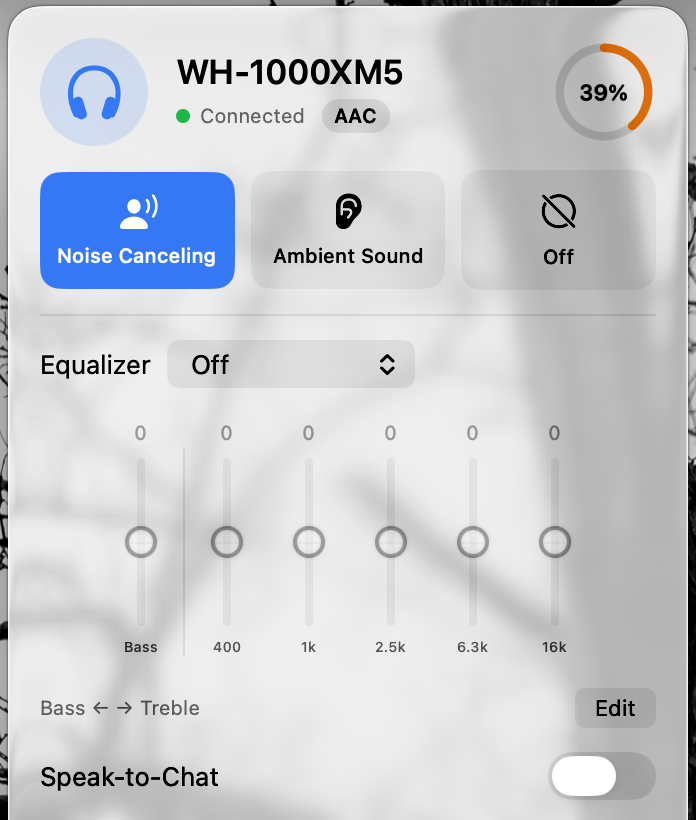
Headphone Control, SonyBridge and Open Sound Connect side by side
Three independent projects control Sony headphones from a Mac. None is made by Sony. Each tests different hardware, so read the testing notes before the feature list. The table summarises each project’s own documentation; we have only tested our own app.
| Option | Best use / requirements | Limits / testing |
|---|---|---|
| Sony Sound Connect on iPhone | Official Sony app: EQ, noise control and firmware updates. Free; official listing is for iPhone. | A phone workflow, not a native Mac controller. Features depend on the headphone model. |
| macOS Bluetooth & Sound | Built in. Pair, connect and choose audio input/output; no extra app required. | Does not expose Sony’s custom headphone EQ or full Sony settings. Audio routing is separate from headphone control. |
| Headphone Control | Free, closed-source TestFlight beta. macOS 14+. Menu-bar ANC, ambient sound, EQ and device switching. | Developer-tested on WH-1000XM5; one user report for WH-CH720N. XM4, XM6 and WF-XM5 untested. No firmware updater. |
| SonyBridge | MIT source; macOS 12+, plus Windows beta and Linux from source. Documents noise control, EQ, battery and multipoint. | README testing notes are mixed: the table lists WH-CH720N and ULT WEAR as verified, while the paragraph says only WH-CH720N is fully hardware-verified. Per-model quirks remain untested. Mac install notes describe an ad-hoc signed build. |
| Open Sound Connect | $9.99 website download; MIT source and repository builds also available; macOS 15+. Documents noise control, EQ, scenes and schedules. | Source README: XM4 hardware checks; XM5/XM6 experimental and not hardware-verified. Website lists over-ear models, not WF earbuds. We have not tested it. Website download requires license activation; Mac App Store version is coming soon. |
Read the detailed three-app comparison · All five Mac options
Test status by model
| Model | Status | Guide |
|---|---|---|
| WH-1000XM5 | Developer-tested on hardware | Mac guide |
| WH-CH720N | User report: works (1 report) | Mac guide |
| WH-1000XM4 | Untested: report needed | Mac guide |
| WH-1000XM6 | Untested: report needed | Mac guide |
| WF-1000XM4 | Untested: report needed | Mac guide |
| WF-1000XM5 | Untested: report needed | Mac guide |
| ULT WEAR | Untested: report needed | Mac guide |
| LinkBuds | Untested: report needed | Mac guide |
Statuses change only with a real result. Own one of these? Post what worked and what didn’t in Discussion #2.
Questions
What is the best Sony Headphones Connect alternative for Mac?
It depends on your model. Headphone Control is free and developer-tested only on WH-1000XM5. SonyBridge is open source and documents WH-CH720N hardware verification. Open Sound Connect costs $9.99 for the website download, needs macOS 15+, and documents XM4 hardware checks.
Is SonyBridge or Open Sound Connect safe to use?
Both publish their source code under the MIT licence, so you can read it. Check each project’s signing and installation notes before downloading; we have not audited or tested them.
Is there an official Sony Headphones Connect app for Mac?
The official Apple listing for Sony Sound Connect, formerly Headphones Connect, is for iPhone. Independent Mac controllers are separate products, not Sony apps.
Does Headphone Control replace all of Sony’s mobile app?
No. Use Sony’s mobile app for firmware updates and Sony-specific setup. Headphone Control focuses on daily controls on a Mac.
Is Headphone Control open source?
No. It is free and closed source. SonyBridge and Open Sound Connect are source-available under the MIT license in their official repositories.
Sources
Primary sources checked on 16 November 2026. Manufacturer pairing instructions describe Bluetooth audio, not Headphone Control compatibility.
Join the free beta
On your Mac: install Apple TestFlight, open the invitation, then Accept → Install. Accepting alone does not install the app. Requires macOS 14+, even if Apple’s generic invitation text says 13. App Store 1.0 is under review.
Join the free beta