Sony headphone apps on Mac: five options compared
Pairing, firmware and desktop controls are different jobs. Choose the tool that covers yours.
Join the free betaHow to read this comparison
This page is published by the Headphone Control developer. Facts were checked against the linked official pages on 16 November 2026. We have not hands-on tested SonyBridge or Open Sound Connect. Their documented features are not our hardware verification.
Five options, by purpose
| Option | Best use / requirements | Limits / testing |
|---|---|---|
| Sony Sound Connect on iPhone | Official Sony app: EQ, noise control and firmware updates. Free; official listing is for iPhone. | A phone workflow, not a native Mac controller. Features depend on the headphone model. |
| macOS Bluetooth & Sound | Built in. Pair, connect and choose audio input/output; no extra app required. | Does not expose Sony’s custom headphone EQ or full Sony settings. Audio routing is separate from headphone control. |
| Headphone Control | Free, closed-source TestFlight beta. macOS 14+. Menu-bar ANC, ambient sound, EQ and device switching. | Only WH-1000XM5 hardware-tested. XM4, XM6 and WF-XM5 untested. No firmware updater. |
| SonyBridge | MIT source; macOS 12+, plus Windows beta and Linux from source. Documents noise control, EQ, battery and multipoint. | README testing notes are mixed: the table lists WH-CH720N and ULT WEAR as verified, while the paragraph says only WH-CH720N is fully hardware-verified. Per-model quirks remain untested. Mac install notes describe an ad-hoc signed build. |
| Open Sound Connect | $9.99 website download; MIT source and repository builds also available; macOS 15+. Documents noise control, EQ, scenes and schedules. | Source README: XM4 hardware checks; XM5/XM6 experimental and not hardware-verified. Website lists over-ear models, not WF earbuds. We have not tested it. Website download requires license activation; Mac App Store version is coming soon. |
Which should you choose?
- Just need music on your Mac? Start with built-in Bluetooth and Sound settings.
- Need firmware updates? Use Sony Sound Connect on your phone.
- Want a free XM5 menu-bar beta on macOS 14+? Try Headphone Control, knowing it is closed source.
- Want source code or an older Mac option? Check SonyBridge’s macOS 12+ build and its own model-testing notes.
- Want documented scenes and scheduled settings? Compare Open Sound Connect’s paid macOS 15+ app and its current model list.
No desktop controller here should be assumed to replace every official Sony feature. For other Headphone Control models, a successful connection is only the beginning of a test.
Real app. One tested model.
This is a real WH-1000XM5 screenshot. It does not demonstrate XM4, XM6 or WF-1000XM5 compatibility.
Headphone Control with WH-1000XM5 on real hardware.
Watch the real XM5 demo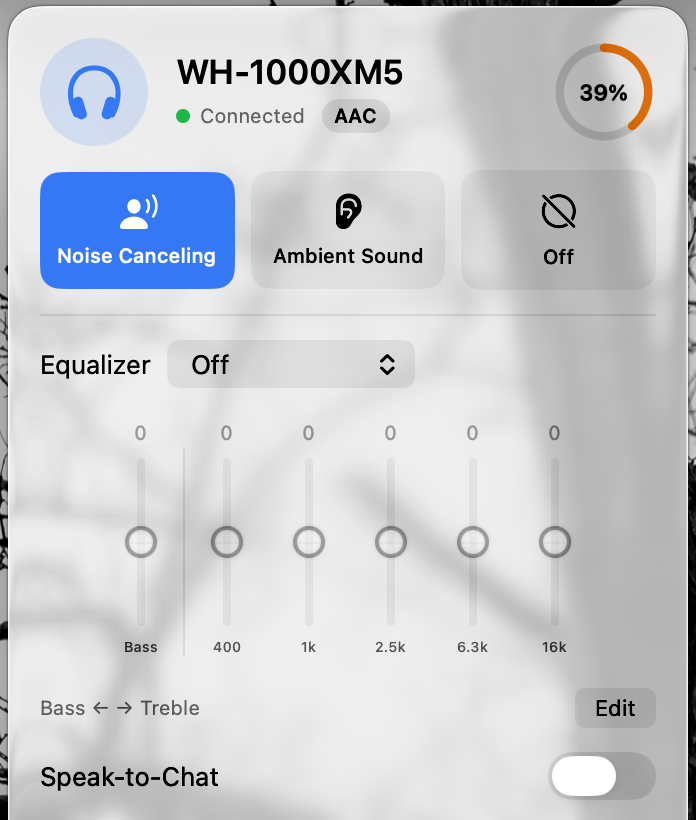
Questions
Is this an independent review?
No. It is a sourced comparison published by the Headphone Control developer. We disclose that relationship and have not tested the other Mac apps ourselves.
Which option is open source?
SonyBridge and Open Sound Connect publish MIT-licensed source. Headphone Control is closed source. Check each official project for current builds, terms and model coverage.
Sources
Primary sources checked on 16 November 2026. Manufacturer pairing instructions describe Bluetooth audio, not Headphone Control compatibility.
Join the free beta
On your Mac: install Apple TestFlight, open the invitation, then Accept → Install. Accepting alone does not install the app. Requires macOS 14+, even if Apple’s generic invitation text says 13. App Store 1.0 is under review.
Join the free beta