Sony WH-1000XM4 on Mac: pairing, multipoint & beta testing
Connect your XM4 for audio first. Then, if you want to help, test the Mac controls we have not verified on this model.
Join the free betaPair for Mac audio
- Enter pairing modeFor a second device, hold the power button for about 7 seconds until the blue indicator repeatedly flashes twice and you hear the pairing prompt.
- Choose the full headphone nameOpen System Settings > Bluetooth. Select WH-1000XM4, not LE_WH-1000XM4. Sony says the full name can take 30–60 seconds to appear.
- Check Mac audioChoose WH-1000XM4 in System Settings > Sound > Output and play a familiar track at a comfortable volume.
XM4 multipoint: two connections, one playback stream
Sony’s XM4 guide says to enable “Connect to 2 devices simultaneously” in its mobile app. Pair each device, connect both, then stop playback on the first before starting the second. Two connections do not mean two mixed audio streams.
The XM4 guide also says multipoint disables LDAC and uses AAC or SBC. This is a headphone setting, not a feature added by a Mac controller. If the Mac is silent, pause the phone before changing anything else.
Help test this model
Keep the Mac connected and test connection status before changing settings. Try one ANC change, one EQ preset and the battery reading separately. If EQ does not respond, report it separately from ANC; a partial result is useful.
- Connection: does the app show the right model and Connected?
- Noise control: try ANC and Ambient. Did the headphones actually change mode?
- EQ: compare one preset with Off at the same volume. Did the sound change?
- Battery and device switching: note the values shown. If you try switching between Mac and phone, record the result separately.
On your Mac: install Apple TestFlight, open the invitation, then Accept → Install. Accepting alone does not install the app. Requires macOS 14+, even if Apple’s generic invitation text says 13. App Store 1.0 is under review.
Copy this into your report
Headphones: WH-1000XM4
Firmware:
Mac model / macOS version:
Headphone Control version / build:
App shows Connected:
ANC changed on the headphones:
EQ changed audibly:
Battery (left / right / case if shown):
Multipoint / device switching (if tested):
What worked / failed:
Steps to reproduce:
Real app. One tested model.
This is a real WH-1000XM5 screenshot. It does not demonstrate XM4, XM6 or WF-1000XM5 compatibility.
Headphone Control with WH-1000XM5 on real hardware.
Watch the real XM5 demo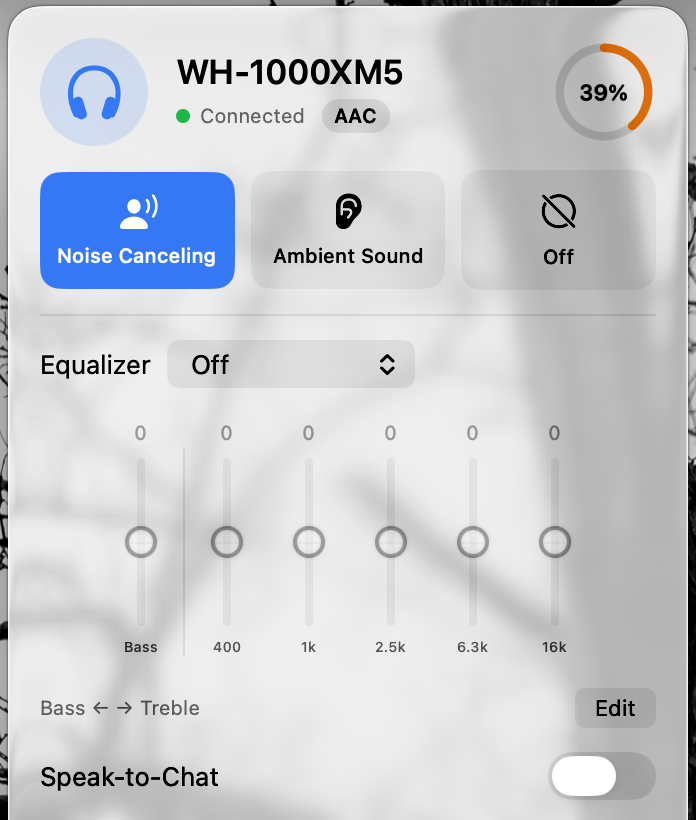
Test status by model
| Model | Status | Guide |
|---|---|---|
| WH-1000XM5 | Developer-tested on hardware | Mac guide |
| WH-CH720N | User report: works (1 report) | Mac guide |
| WH-1000XM4 | Untested: report needed | Mac guide |
| WH-1000XM6 | Untested: report needed | Mac guide |
| WF-1000XM4 | Untested: report needed | Mac guide |
| WF-1000XM5 | Untested: report needed | Mac guide |
| ULT WEAR | Untested: report needed | Mac guide |
| LinkBuds | Untested: report needed | Mac guide |
Statuses change only with a real result. Own one of these? Post what worked and what didn’t in Discussion #2.
Questions
Does Headphone Control work with WH-1000XM4?
WH-1000XM4 is untested in Headphone Control. We cannot promise ANC, EQ, battery or multipoint controls on it. Only WH-1000XM5 has been tested on real hardware.
Will Bluetooth audio work without Headphone Control?
Sony documents Mac pairing for this model. Normal audio pairing is independent of Headphone Control and does not prove that its ANC or EQ controls work.
Sources
Primary sources checked on 16 November 2026. Manufacturer pairing instructions describe Bluetooth audio, not Headphone Control compatibility.
Join the free beta
On your Mac: install Apple TestFlight, open the invitation, then Accept → Install. Accepting alone does not install the app. Requires macOS 14+, even if Apple’s generic invitation text says 13. App Store 1.0 is under review.
Join the free beta