Why I made Headphone Control for the Mac
The idea is simple: changing a headphone setting during Mac work should not require reaching for a phone.
Join the free betaStart with the setting, not the phone
Headphone Control is built around a small task: change Sony headphone settings from the Mac you are already using. Noise control, ambient sound and EQ belong close to the music or work that made you want to change them.
The result is a menu-bar app. Open its panel, choose the setting and return to what you were doing. This is the reason for the product, rather than a claim that nobody else has built a Sony controller.
How that idea becomes an interface
The app talks to the headphones over Bluetooth. The panel groups noise control, ambient sound and equalizer settings so that daily actions are available from the Mac. Profiles, call/app rules and Shortcuts are part of the beta’s workflow features.
The public walkthrough uses real WH-1000XM5 screenshots. Demo mode lets you explore the interface without a headset; a demo is not a hardware test. The video and guides show what the panel looks like; the Bluetooth side is covered in an engineering note on the RFCOMM framing.
One tested model means one tested model
Only Sony WH-1000XM5 has been tested on real hardware. WH-1000XM4, WH-1000XM6, WF-1000XM5 and the other listed models remain untested. A model name in the interface, a shared family or a successful Bluetooth pairing is not proof that every command works.
That is why the model pages ask for separate connection, ANC, EQ and battery results. “Connected, but EQ did not change” is a useful report. It should not be rounded up to “supported.”
Free, closed source, still a beta
Headphone Control is free and closed source, requires macOS 14+, and is available through TestFlight. The app’s controls work locally over Bluetooth; it has no app account, analytics or network access. Apple’s TestFlight distribution and feedback services are separate.
Closed source is a real tradeoff if you want to inspect or modify the implementation. The comparison guide links to SonyBridge and Open Sound Connect, which publish their source. Choose the tool that fits your priorities.
What makes the next version better
App Store 1.0 is under review. That is not an approval or a release date. For now, install the TestFlight beta, try one setting at a time and send a report with the exact headphone model, firmware, macOS version and app build.
A small, reproducible failure helps more than a broad compatibility guess. The aim is to turn unknowns into hardware evidence, one model and one control at a time.
Real app. One tested model.
This is a real WH-1000XM5 screenshot. It does not demonstrate XM4, XM6 or WF-1000XM5 compatibility.
Headphone Control with WH-1000XM5 on real hardware.
Watch the real XM5 demo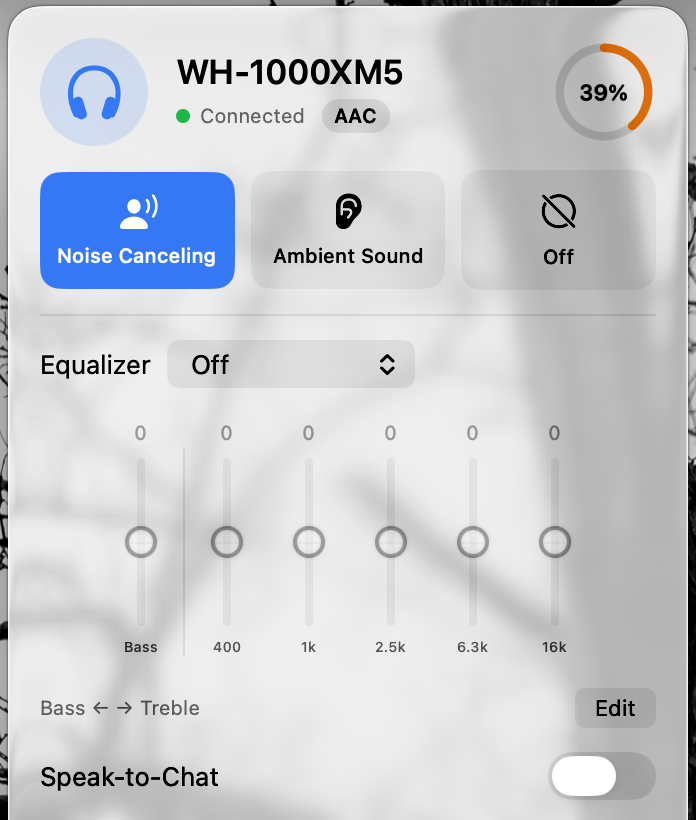
Questions
Is Headphone Control made by Sony?
No. It is independently developed and is not affiliated with or endorsed by Sony.
Why does the site keep mentioning the XM5 test limit?
Because only WH-1000XM5 has been tested on real hardware. Clear limits let people make an informed choice and report other models without mistaking a beta invitation for a support promise.
Join the free beta
On your Mac: install Apple TestFlight, open the invitation, then Accept → Install. Accepting alone does not install the app. Requires macOS 14+, even if Apple’s generic invitation text says 13. App Store 1.0 is under review.
Join the free betaKeep reading
- Talking to Sony headphones from a sandboxed macOS app
- Sony Headphones Connect for Mac: your alternatives
- Sony WH-1000XM4 on Mac: pairing, multipoint & beta testing
- Sony WH-1000XM6 on Mac: setup & an honest beta test
- Sony WF-1000XM5 on Mac: earbuds setup & beta testing
- How to change Sony ANC and EQ on a Mac
- Sony headphone apps on Mac: five options compared