Sony WH-1000XM6 on Mac: setup & an honest beta test
Sony documents normal Mac pairing for the XM6. Headphone Control testing on this model is still an open question.
Join the free betaPair for Mac audio
- Use the Bluetooth buttonFor a second or subsequent device, hold the XM6 Bluetooth button for about 5 seconds or more. Wait for the blue double flash and the pairing prompt.
- Connect in macOSOpen System Settings > Bluetooth, select WH-1000XM6 and choose Connect. Keep the charged headphones near the Mac during setup.
- Verify playback firstSelect WH-1000XM6 under System Settings > Sound > Output. Play audio before testing any independent controller.
Do not copy an XM5 result onto an XM6
A shared product family is not a hardware test. We have real WH-1000XM5 screenshots and testing, but no verified XM6 result for Headphone Control. Even if a connection works, that does not prove every EQ band, noise mode or device control works.
Keep Sony Sound Connect for firmware and model-specific settings. This beta is not a firmware updater and does not claim to expose every XM6 feature. If you need predictable controls today, use Sony’s app and the headset’s own controls.
Help test this model
Record the firmware and macOS version first. Check whether the app identifies WH-1000XM6 correctly. Try a noise-mode change, an EQ preset and battery separately; report missing or unexpected controls without assuming the XM5 layout should be identical.
- Connection: does the app show the right model and Connected?
- Noise control: try ANC and Ambient. Did the headphones actually change mode?
- EQ: compare one preset with Off at the same volume. Did the sound change?
- Battery and device switching: note the values shown. If you try switching between Mac and phone, record the result separately.
On your Mac: install Apple TestFlight, open the invitation, then Accept → Install. Accepting alone does not install the app. Requires macOS 14+, even if Apple’s generic invitation text says 13. App Store 1.0 is under review.
Copy this into your report
Headphones: WH-1000XM6
Firmware:
Mac model / macOS version:
Headphone Control version / build:
App shows Connected:
ANC changed on the headphones:
EQ changed audibly:
Battery (left / right / case if shown):
Multipoint / device switching (if tested):
What worked / failed:
Steps to reproduce:
Real app. One tested model.
This is a real WH-1000XM5 screenshot. It does not demonstrate XM4, XM6 or WF-1000XM5 compatibility.
Headphone Control with WH-1000XM5 on real hardware.
Watch the real XM5 demo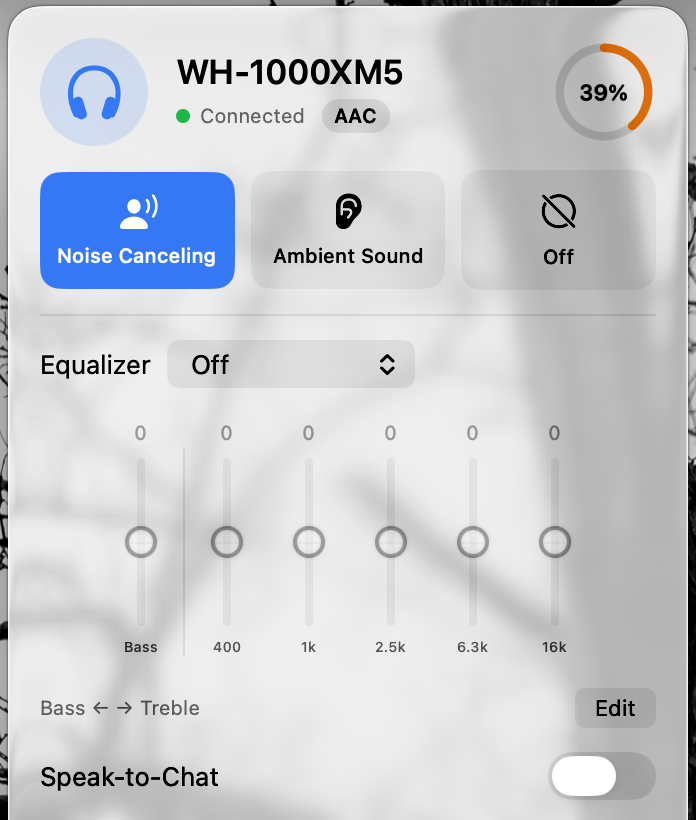
Test status by model
| Model | Status | Guide |
|---|---|---|
| WH-1000XM5 | Developer-tested on hardware | Mac guide |
| WH-CH720N | User report: works (1 report) | Mac guide |
| WH-1000XM4 | Untested: report needed | Mac guide |
| WH-1000XM6 | Untested: report needed | Mac guide |
| WF-1000XM4 | Untested: report needed | Mac guide |
| WF-1000XM5 | Untested: report needed | Mac guide |
| ULT WEAR | Untested: report needed | Mac guide |
| LinkBuds | Untested: report needed | Mac guide |
Statuses change only with a real result. Own one of these? Post what worked and what didn’t in Discussion #2.
Questions
Is WH-1000XM6 supported by Headphone Control?
WH-1000XM6 has not been tested on real hardware with Headphone Control. It is a request for beta testers, not a support claim. Only WH-1000XM5 is hardware-tested.
Will Bluetooth audio work without Headphone Control?
Sony documents Mac pairing for this model. Normal audio pairing is independent of Headphone Control and does not prove that its ANC or EQ controls work.
Sources
Primary sources checked on 16 November 2026. Manufacturer pairing instructions describe Bluetooth audio, not Headphone Control compatibility.
Join the free beta
On your Mac: install Apple TestFlight, open the invitation, then Accept → Install. Accepting alone does not install the app. Requires macOS 14+, even if Apple’s generic invitation text says 13. App Store 1.0 is under review.
Join the free beta