How to control Sony LinkBuds on Mac: pairing, ANC & EQ
“LinkBuds” covers several Sony earbuds: the original ring-shaped LinkBuds, LinkBuds S, Fit and Open. They pair differently, and none has been tested with Headphone Control yet.
Join the free betaPair LinkBuds with your Mac
Sony documents Mac pairing for LinkBuds and LinkBuds S on macOS 10.15 or later. LinkBuds Fit and LinkBuds Open have their own Sony help guides; follow the one for your model if the button or light differs.
- Original LinkBuds: use the case buttonPut both earbuds in the case, close the lid, then open it again. Press and hold the pairing button on the case for about 5 seconds until the indicator starts flashing blue.
- LinkBuds S: keep the lid openWith both earbuds in the case and the lid open, hold the pairing button on the back of the case for about 5 seconds. Sony notes it won’t enter pairing mode with the lid closed.
- Connect and choose the outputOn the Mac, open System Settings > Bluetooth and click Connect next to your LinkBuds, entering 0000 if a passkey is requested. Then pick them in System Settings > Sound > Output.
Which LinkBuds do you have?
The original LinkBuds (WF-L900) have an open ring design and no noise canceling. LinkBuds S, Fit and Open are separate products with their own firmware and feature sets. A result on one LinkBuds model does not carry over to another.
Headphone Control has not been tested on any LinkBuds model. When you report, the exact name on the box or in Bluetooth settings matters most.
Own LinkBuds? Run the 2-minute test
Write down the exact model first. Confirm Mac audio, then try each control the app shows (noise control, ambient sound, EQ) and note which battery values appear. Post in Discussion #2 or use the options below.
- Connection: does the app show the right model and Connected?
- Noise control: try ANC and Ambient. Did the headphones actually change mode?
- EQ: compare one preset with Off at the same volume. Did the sound change?
- Battery and device switching: note the values shown. If you try switching between Mac and phone, record the result separately.
On your Mac: install Apple TestFlight, open the invitation, then Accept → Install. Accepting alone does not install the app. Requires macOS 14+, even if Apple’s generic invitation text says 13. App Store 1.0 is under review.
Copy this into your report
Headphones: LinkBuds (which model?)
Firmware:
Mac model / macOS version:
Headphone Control version / build:
App shows Connected:
ANC changed on the headphones:
EQ changed audibly:
Battery (left / right / case if shown):
Multipoint / device switching (if tested):
What worked / failed:
Steps to reproduce:
Real app. One tested model.
This is a real WH-1000XM5 screenshot. It does not show that any other model works.
Headphone Control with WH-1000XM5 on real hardware.
Watch the real XM5 demo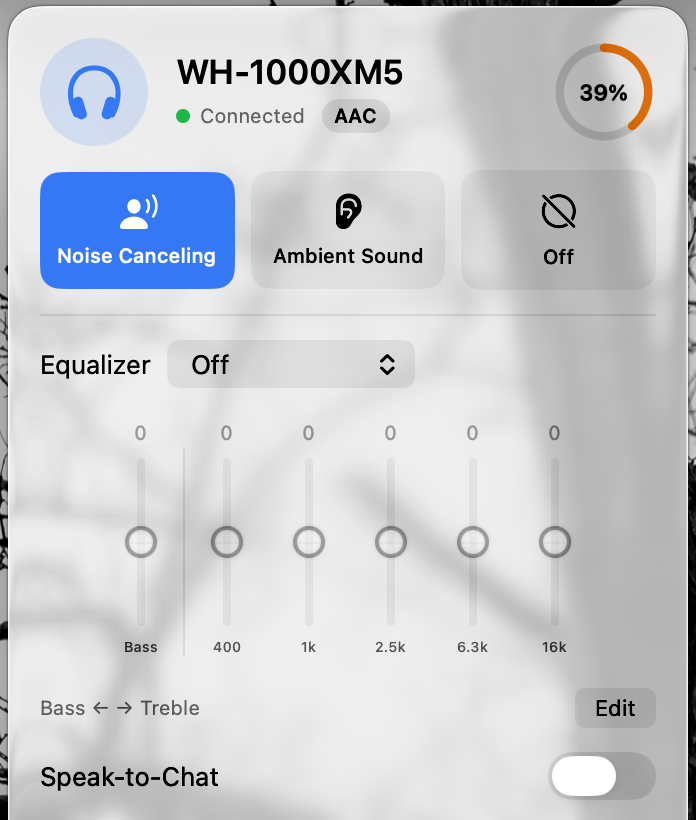
Test status by model
| Model | Status | Guide |
|---|---|---|
| WH-1000XM5 | Developer-tested on hardware | Mac guide |
| WH-CH720N | User report: works (1 report) | Mac guide |
| WH-1000XM4 | Untested: report needed | Mac guide |
| WH-1000XM6 | Untested: report needed | Mac guide |
| WF-1000XM4 | Untested: report needed | Mac guide |
| WF-1000XM5 | Untested: report needed | Mac guide |
| ULT WEAR | Untested: report needed | Mac guide |
| LinkBuds | Untested: report needed | Mac guide |
Statuses change only with a real result. Own one of these? Post what worked and what didn’t in Discussion #2.
Questions
Can I control Sony LinkBuds from a Mac?
Sony has no Mac app. Headphone Control is a free macOS 14+ beta that implements the Sony protocol, but no LinkBuds model has been tested. Report your exact model and result in GitHub Discussion #2.
How do I put LinkBuds S in pairing mode for a Mac?
Put both earbuds in the case with the lid open and hold the pairing button on the back of the case for about 5 seconds. Then click Connect in System Settings > Bluetooth.
Do the original LinkBuds have noise canceling?
No. The original ring-shaped LinkBuds (WF-L900) are an open design without noise canceling. LinkBuds S has noise canceling.
Sources
Primary sources checked on 18 November 2026. Sony’s pairing instructions describe Bluetooth audio, not Headphone Control compatibility.
Join the free beta
On your Mac: install Apple TestFlight, open the invitation, then Accept → Install. Accepting alone does not install the app. Requires macOS 14+, even if Apple’s generic invitation text says 13. App Store 1.0 is under review.
Join the free beta