Sony WF-1000XM5 on Mac: earbuds setup & beta testing
These are the WF earbuds, not the WH over-ear XM5. A test of one does not validate the other.
Join the free betaPair for Mac audio
- Use the open charging caseFor another device, put both earbuds in the charging case and leave its lid open. Hold the pairing button on the back for about 5 seconds or more until the blue indicator repeatedly flashes twice.
- Choose WF-1000XM5 on the MacOpen System Settings > Bluetooth and connect WF-1000XM5. The case lid must be open to enter pairing mode. Remove the earbuds after entering pairing mode if needed.
- Select the earbuds as outputChoose WF-1000XM5 under System Settings > Sound > Output and check playback before opening a controller.
WF and WH: one letter changes the test
Headphone Control was tested with the WH-1000XM5 over-ear headset. That does not verify the WF-1000XM5 earbuds. We have no hardware-confirmed result for the WF model, including its left/right or case battery readings.
For a useful earbud report, note whether both earbuds were out of the case, whether one was in use, and which battery values appeared. Do not treat an absent case value as proof that the case is empty. Use Sony’s app when you need a known model-specific setup path.
Help test this model
Begin with both earbuds connected for playback. Check ANC and EQ independently. Record whether the battery display refers to left, right, case or a single value. If a value is missing or stale, say so; do not infer it from the WH-XM5 screenshot.
- Connection: does the app show the right model and Connected?
- Noise control: try ANC and Ambient. Did the headphones actually change mode?
- EQ: compare one preset with Off at the same volume. Did the sound change?
- Battery and device switching: note the values shown. If you try switching between Mac and phone, record the result separately.
On your Mac: install Apple TestFlight, open the invitation, then Accept → Install. Accepting alone does not install the app. Requires macOS 14+, even if Apple’s generic invitation text says 13. App Store 1.0 is under review.
Copy this into your report
Headphones: WF-1000XM5
Firmware:
Mac model / macOS version:
Headphone Control version / build:
App shows Connected:
ANC changed on the headphones:
EQ changed audibly:
Battery (left / right / case if shown):
Multipoint / device switching (if tested):
What worked / failed:
Steps to reproduce:
Real app. One tested model.
This is a real WH-1000XM5 screenshot. It does not demonstrate XM4, XM6 or WF-1000XM5 compatibility.
Headphone Control with WH-1000XM5 on real hardware.
Watch the real XM5 demo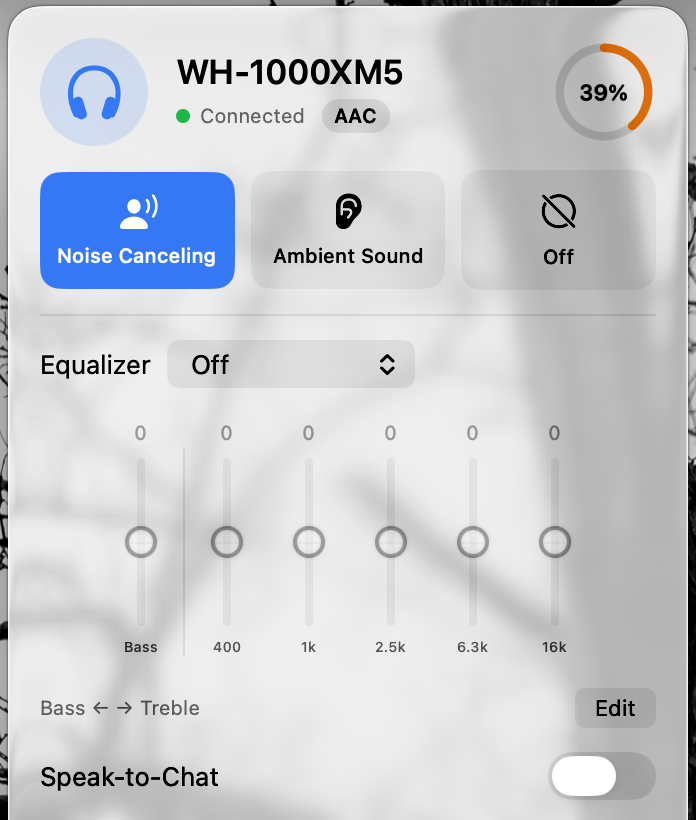
Test status by model
| Model | Status | Guide |
|---|---|---|
| WH-1000XM5 | Developer-tested on hardware | Mac guide |
| WH-CH720N | User report: works (1 report) | Mac guide |
| WH-1000XM4 | Untested: report needed | Mac guide |
| WH-1000XM6 | Untested: report needed | Mac guide |
| WF-1000XM4 | Untested: report needed | Mac guide |
| WF-1000XM5 | Untested: report needed | Mac guide |
| ULT WEAR | Untested: report needed | Mac guide |
| LinkBuds | Untested: report needed | Mac guide |
Statuses change only with a real result. Own one of these? Post what worked and what didn’t in Discussion #2.
Questions
Does the WH-1000XM5 test also cover WF-1000XM5?
No. WH-1000XM5 is an over-ear headset; WF-1000XM5 is a different earbud model. Headphone Control is untested on WF-1000XM5, including its controls and battery values.
Will Bluetooth audio work without Headphone Control?
Sony documents Mac pairing for this model. Normal audio pairing is independent of Headphone Control and does not prove that its ANC or EQ controls work.
Sources
Primary sources checked on 16 November 2026. Manufacturer pairing instructions describe Bluetooth audio, not Headphone Control compatibility.
Join the free beta
On your Mac: install Apple TestFlight, open the invitation, then Accept → Install. Accepting alone does not install the app. Requires macOS 14+, even if Apple’s generic invitation text says 13. App Store 1.0 is under review.
Join the free beta